BitradeX Start Guide: How to Open an Account, Deposit, Withdraw, and Exchange Fees Explained
 BitradeX Referrer
Disclaimer: This website and its content are for informational and educational purposes only and do not constitute investment advice.
Important Information, Risk Disclosures, and Disclaimers
Do you feel like you want to start investing but simply don't have the time to stay glued to market charts?
Perhaps you are interested in AI-driven automated trading but feel intimidated by the perceived complexity?
BitradeX is gaining significant attention as a next-generation cryptocurrency exchange that bridges this gap.
It provides an environment where anyone can easily utilize sophisticated AI trading bots (AiBot) to manage their assets.
For many beginners, the first major hurdle is often the account registration and identity verification (KYC) process.
While global exchanges can sometimes feel daunting, BitradeX offers a seamless, user-friendly experience that can be completed entirely on your smartphone.
In this article, we provide a comprehensive walkthrough of the specific steps to open a BitradeX account.
We also cover essential information on fee structures to minimize costs and deposit/withdrawal rules to help you maximize your returns.
By following this guide, you will understand how to create a secure account and smoothly transition into a new form of AI-powered investing.
Even if you are starting with zero prior knowledge, you can take a confident first step toward efficient wealth building today.
If you would like to open a BitradeX account with AiBot access, you can register via the link below. (Invitation Code: ZV3OC1)
If you want to open an account that supports AiBot, you can register using the link below.
Invitation Code: G3CE71
Note: To use the BitradeX AiBot, you must register through an invitation link (like the button above). Please be aware that standard registration links do not provide access to the AiBot feature.
Why BitradeX is the Choice for Everyone from Beginners to Pro Investors

The primary reason BitradeX has earned widespread support from global users is its ability to make cutting-edge AI-driven asset management accessible to everyone.
By opening up sophisticated automated trading systems—which were once reserved for professional traders—to individual investors, the platform has grown to serve over 1 million users across 60 countries.
Let’s take a closer look at the platform's reliability and its unique competitive advantages.
High Security and Reliability Meeting Strict Global Standards
When using an international cryptocurrency exchange, security and legal compliance are often the top concerns for users.
BitradeX is registered as a UK-based corporation and operates with full transparency.

The platform has officially obtained the MSB (Money Services Business) license, which is strictly regulated by the U.S. Department of the Treasury.
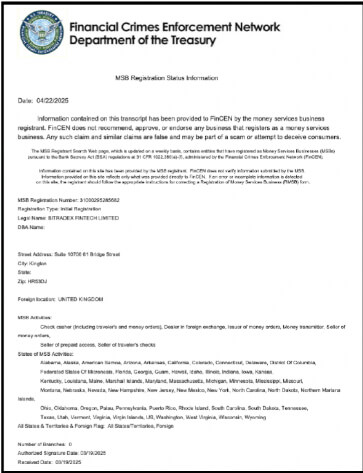
This license serves as a definitive proof of compliance with rigorous anti-money laundering (AML) regulations, providing peace of mind for anyone considering opening an account.
Furthermore, BitradeX has earned high praise from "CertiK," one of the world's leading blockchain security auditing firms.
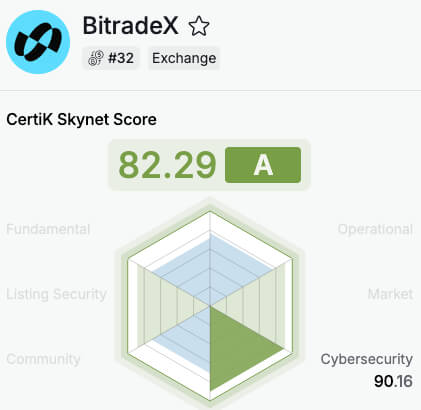
By maintaining an A-rank security score of over 80, the platform's robust infrastructure and defense against hacking attempts are objectively verified.
If you'd like to learn more about why BitradeX is gaining third-party ratings and rising in the rankings, please check out the article below.
BitradeX Rankings: How Reliable are the CertiK and CoinMarketCap Ratings?
Is BitradeX safe? Explore BitradeX’s global rankings on CertiK and CoinMarketCap. Learn how high-yield AI investing works, verify security audits, and start tr…
 Cryptocurrency Info
Strategic Partnerships with Global Investment Firms and Celebrities
BitradeX's rapid expansion is backed by a rock-solid financial foundation.
The platform is actively building its global brand, notably appointing 2018 FIFA World Cup winner Olivier Giroud as an official ambassador.

The combination of major institutional backing and high-profile recognition has been a key factor in the platform's explosive user growth.
A Unique "Fund Pool" System Designed to Protect Beginner Assets
While all investing involves risk, BitradeX has introduced a revolutionary mechanism to ensure beginners can invest with confidence.
This is known as the "Fund Pool"(Treasury Pool) revenue guarantee system.
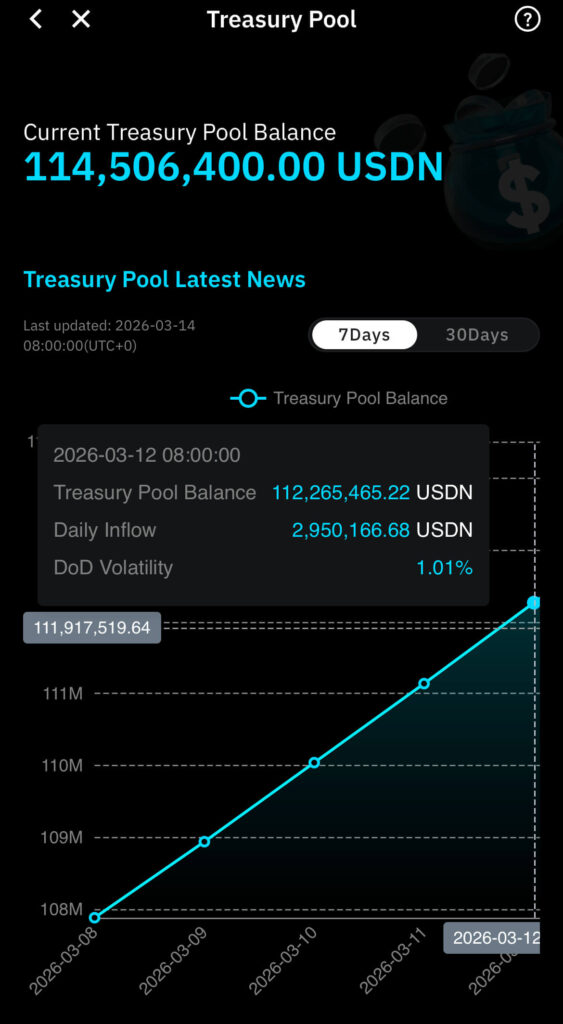
In the event that the AI incurs a loss due to extreme market volatility, compensation is provided from a dedicated, pre-accumulated fund.
This unique safety net allows users to aim for stable returns without the constant stress of daily market fluctuations.
The BTX Token Powering a Next-Generation Ecosystem
BitradeX has launched its own native utility token, "BTX." Built on the Solana (SOL) blockchain, which is renowned for its high-speed processing, BTX offers various benefits such as trading fee discounts within the platform.
A "burn" mechanism has also been implemented, where the exchange uses a portion of its profits to periodically buy back and destroy BTX tokens from the market.
This deflationary model is designed to increase the scarcity and value of the token over time.
As a result, users can aim for long-term capital gains simply by holding BTX within the ecosystem.
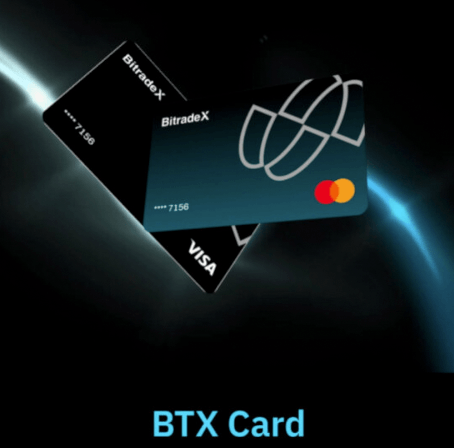
Please refer to the article below for information on BTX cards.
【BitradeX BTX Card Guide】How to Issue & Use Crypto for Everyday Payments
Master crypto payments with the BitradeX operating company’s BTX Card. Our guide explains how to issue your card, link Apple Pay, and enjoy 0% foreign transact…
Required Documents for BitradeX Identity Verification
To begin trading and utilizing AI bots on BitradeX, completing the Identity Verification (KYC) process is an essential step after your initial registration.
By gathering the necessary items in advance, you can ensure a smooth setup process without any unexpected interruptions.
Below is a summary of the mandatory items required for BitradeX account opening and key tips to help you pass the screening on your first attempt.
Contact Information Required for Registration
First, you will need either a valid "email address" or a "mobile phone number" for account authentication purposes.
While carrier-specific emails are technically allowed, we highly recommend using a versatile service like Gmail or Yahoo Mail.
Using a global email provider ensures you can maintain access to your account during future device upgrades or when accessing the platform from abroad.
Accepted Identity Verification Documents
For identity verification, a valid government-issued photo ID is indispensable.
BitradeX officially accepts the following documents for the KYC process:
- Driver’s License (Both front and back images are required)
- Passport (Both the photo page and address page are required)
- My Number Card (Both front and back are required; please note that notification cards are not accepted)
Since the verification process uses AI-driven image analysis, your name and address must be perfectly legible.
If you have recently moved, please double-check that the address on the back of your ID matches your current place of residence before submitting.
Smartphone Requirements and Connection Tips
The BitradeX identity verification process is designed to be completed using your smartphone’s camera.
In addition to capturing your documents, you will need to undergo a facial recognition process (selfie), so please ensure your device's camera is functioning correctly.
Because uploading high-resolution images can consume a significant amount of data, it is wise to perform these steps while connected to a stable Wi-Fi network.
To minimize the risk of being asked to resubmit, find a well-lit indoor area and ensure there are no reflections or shadows obscuring the information on your ID.
BitradeX Account Setup: A Step-by-Step Registration Guide
Setting up an account on BitradeX is remarkably simple and can be completed in about five minutes if you are prepared.
While you can register via either a PC or a smartphone, we recommend using the mobile app from the start to ensure a smooth transition to the identity verification (KYC) process, which requires your camera.
Below is a specific, step-by-step walkthrough to help you create your account without any confusion.
Step 1: Start Your Registration via an Invitation Link
To begin, access the official BitradeX website specifically through an invitation link.
The reason for using an invitation link is critical: registration via a referral is mandatory if you wish to utilize the automated AiBot features.
If your goal is simply to store cryptocurrency, a standard registration is fine; however, if you intend to grow your assets using the AiBot, please register using the invitation link below.
Invitation Link: https://www.bitradex.ai/en/account/register?inviteCode=ZV3OC1
Before proceeding, confirm that the invitation code "ZV3OC1" is automatically filled in, then enter either your email address or mobile phone number.
For information on registering with BitradeX via an invitation link, please also refer to the article below.
【BitradeX Invitation Link & Code Included】Sign Up via Referral Link to Access AiBot
Unlock the exclusive BitradeX AiBot with our official invitation code: ZV3OC1. Learn how to register via the referral link to activate AI-driven automated trad…
Step 2: Enter and Confirm Your Verification Code
Once you submit your details, a 6-digit "Verification Code" will be sent immediately to your chosen contact method.
Please note that this is different from your invitation code; it is a temporary password used to verify that your contact information is valid.
If you registered via email, check your inbox (and your spam folder if it doesn't appear).
If you used a phone number, check your SMS messages and enter the numbers exactly as they appear into the input field on your screen.
Because these codes have a short expiration time, be sure to complete this step as soon as the message arrives.
Step 3: Create a Robust Login Password
Next, you will need to set a secure password for your account.
To ensure the highest level of security for your assets, BitradeX requires your password to meet the following criteria:
- A length of 8 to 30 characters.
- A combination of at least three types: uppercase letters, lowercase letters, and numbers.
Avoid using passwords that you have already used on other websites, and create a unique string that is difficult for others to guess.
This password is the primary key to protecting your assets, so be sure to record it in a safe place or use a trusted password management app.
Step 4: Install the App and Log In
If you started the registration process in a web browser, we highly recommend downloading the official BitradeX app at this stage.
The app is designed to be lightweight and responsive, allowing you to intuitively monitor your AiBot’s performance and analyze market charts on the go.
Once the installation is complete, log in using the email address (or phone number) and the password you just created.
If you can navigate to the "User Center" via the icon in the top-left corner of the home screen, your account setup is successfully complete.
Now that your account is active, you are ready to move on to advanced security settings and identity verification.
Enhancing Your BitradeX Security with 2FA and Anti-Phishing Settings
The most critical task to complete immediately after opening your BitradeX account is configuring your security settings. In the world of cryptocurrency, adopting a mindset of taking full responsibility for protecting your own assets is essential.
BitradeX is a highly reputable exchange that has earned high marks from the blockchain security auditor "CertiK" and holds an official MSB license from the U.S. Department of the Treasury.
However, even with these platform-level safeguards, the risk of unauthorized access cannot be completely eliminated if your personal account settings are weak.
This section provides a detailed guide on setting up Two-Factor Authentication (2FA) and anti-phishing measures to ensure ironclad protection for your valuable assets.
Step-by-Step Guide to Setting Up the Google Authenticator App
Using "Google Authenticator" is the most highly recommended method for Two-Factor Authentication.
This system functions by generating a one-time password (OTP) on your smartphone app that refreshes every 30 seconds.
Even in the unlikely event that your login password is compromised, it is virtually impossible for a third party to infiltrate your account without having physical access to your specific device. Follow these steps to complete the setup:
1. Install the App
Download "Google Authenticator" from the App Store or Google Play Store.
2. Access Security Settings
Open the BitradeX app, navigate to the User Center, select "Security Center," and then tap on "Google Authentication."
3. Scan the QR Code
Use the Google Authenticator app to scan the QR code displayed on your BitradeX screen.
4. Save Your Backup Key
Crucially, you must write down the alphanumeric backup key displayed below the QR code on a piece of paper and store it safely. This key is necessary to recover your account if you ever lose or break your smartphone.
5. Verify the Connection
Enter the 6-digit code currently displayed in the authenticator app into the BitradeX input field to finalize the link.
By simply completing this setup, you will exponentially increase the security level of your account.
BitradeX Verification and KYC Application
After completing your BitradeX account registration, the next essential step to unlock all platform features is Identity Verification (KYC).
KYC stands for "Know Your Customer," which is a standard legal procedure used by financial institutions to verify a user's identity.
By passing this screening, you gain access to significant benefits, including the use of AI-driven trading (AiBot), fiat currency transactions, and increased withdrawal limits.
As a UK-registered entity holding a U.S. Treasury MSB license, BitradeX ensures this process is both rigorous and remarkably efficient.
Tips for Facial Recognition and Document Capture via Smartphone
To ensure your identity verification is approved on the first attempt, preparing the right environment for your photos is crucial.
The BitradeX KYC process requires two main components: a "clear photo of your ID" and a "selfie" with that ID.
When photographing your identification document, please keep the following points in mind:
- Minimize Light Reflection
Glare from overhead lights on the card’s surface can make text unreadable, leading to immediate rejection. - Choose a Neutral Background
If the surface under your ID is cluttered or patterned, the camera may struggle to focus; use a plain table or a white sheet of paper instead. - Keep All Corners in Frame
If any part of the document is cut off, it will be considered invalid. Next is the facial verification (selfie) process, which requires capturing both your face and the ID in a single shot. - Do Not Obscure Your Face
Ensure your hair, mask, or hat does not hide your facial features or eyes. - Avoid Covering ID Text with Fingers
Hold the card by its edges so your fingers do not block your name, date of birth, or photo. - Use Bright, Natural Light
Dim environments result in grainy images that often trigger errors in the AI-driven automated analysis. Make sure the image is perfectly in focus before hitting the submit button.
Estimated Approval Time and Important Considerations
BitradeX’s verification speed is among the fastest in the industry.
Typically, the process is completed within 10 to 30 minutes of submission, though it may take up to 24 hours during peak times.
If you feel the approval is taking too long or if your application was rejected, please double-check the following items:
- Name Spelling Discrepancies
Ensure the name you entered exactly matches the text on your ID, paying close attention to middle names or character formats. - Document Expiration
Confirm that your driver’s license or passport has not expired. - Address Mismatch
Your application will not pass if the registered address differs from the current residential address listed on your documents.
Once you successfully pass the screening, your account status will change to "Verified." At this point, your security level is fully enhanced, and you are ready to start utilizing the high-yield AI trading bots that everyone is talking about.
BitradeX Fee Structure: Deposits and Withdrawals Explained
BitradeX adopts a simple and highly transparent fee structure to ensure all users can manage their assets with complete peace of mind.
Essentially, the platform operates on a system where deposits are free of charge, while withdrawals only incur standard blockchain network fees.
This clarity allows investors to calculate their costs accurately before moving any funds.
Deposit Fees: Free Processing and Minimum Amount Warnings
BitradeX does not charge any fees for depositing cryptocurrency into your account.
Whether you are transferring from an external wallet or another exchange, BitradeX will not deduct any commission for receiving your assets.
However, it is crucial to pay close attention to the "Minimum Deposit Amount" listed for each specific currency.
If a transfer amount falls below this minimum threshold, the assets will not be automatically credited to your account.
In the event that you need to recover these unreflected assets, you must contact customer support, which may involve additional recovery service fees.
Withdrawal Fees: Understanding Network and Gas Fees
When withdrawing funds, a "Miner Fee" (also known as a Gas Fee) is required to pay the network validators who process the transaction.
It is important to understand that these fees are not paid to BitradeX, but rather serve as compensation for the computing resources required to confirm transactions on the blockchain.
The specific fee amount fluctuates in real-time based on current network congestion and the complexity of the transaction.
The final amount delivered to your destination wallet is calculated as the "Withdrawal Amount minus the Withdrawal Fee."
Adjusting Arrival Amounts and Managing Transaction Speed
BitradeX offers a convenient "Adjust Arrival Amount" feature that allows you to precisely control the net amount your recipient receives.
For example, if the network fee is 1 USDT and you need exactly 4 USDT to reach the destination, you can set the system to automatically adjust the total withdrawal to 5 USDT.
Additionally, you have the option to manually set a higher fee to encourage miners to prioritize your transaction.
Increasing the fee can significantly reduce waiting times, which is highly recommended for time-sensitive trades or urgent transfers.
New Network Support and Fee Examples from May 2025
To enhance user convenience, BitradeX expanded its network support for several major tokens, including BNB, SHIB, and TRX, starting May 10, 2025.
For instance, the withdrawal fee for BNB via the ERC20 network is set at 0.002 BNB, while SHIB on the BEP20 network incurs a fee of 80,000 SHIB.
Each supported network has its own specific minimum withdrawal limits and fee schedules.
Because selecting the wrong network can result in the permanent loss of your assets, always verify the latest information displayed on the withdrawal page before confirming your transaction.
How to Deposit Assets and Start Trading on BitradeX
Now that you’ve successfully completed your BitradeX account setup and KYC verification, it’s time to prepare your investment capital.
Moving funds to an exchange can be the most nerve-wracking part for beginners, but it is quite simple once you understand the correct procedures.
BitradeX offers multiple deposit routes designed for user convenience, allowing you to choose the best method for your specific needs.
In this section, we provide a detailed guide on two specific deposit methods to help you start trading smoothly.
Steps to Transfer Cryptocurrency from External Wallets or Exchanges
If you already hold cryptocurrency in a local exchange or a private wallet, transferring those assets to your BitradeX address is the most common method.
The transfer process flows as follows:
1. Locate your deposit address in the BitradeX app.
On the mobile app, navigate to the "Home" tab at the bottom left and tap the "Deposit" button located near the top right.
2. Select the currency and network you wish to deposit.
Choose "On-chain Deposit." For example, if you are sending USDT, you must specify a "Network" such as ERC20 or TRC20.
3. Copy your unique address.
Copy the alphanumeric "Deposit Address" or display the QR code provided on the screen.
4. Complete the transfer at your sending platform.
Paste the copied address into the withdrawal field of your external wallet, enter the amount, and execute the transfer.
Essential Tip for Beginners: What is a Network?
Think of a network as a "dedicated highway" for cryptocurrency. If you do not select the matching network on both the sending and receiving ends (e.g., TRC20 to TRC20), your assets may get lost in transit and become unrecoverable.
It is always wise to perform a small test transfer first to ensure everything is set up correctly. The main advantage of this method is that transaction fees are generally much lower compared to credit card payments. Many investors prefer using assets like XRP (Ripple) for transfers due to its high speed and minimal cost.
How to Easily Purchase Crypto with a Credit Card
For those who do not have accounts at other exchanges or want to activate AI bots immediately, direct purchasing via credit card is incredibly convenient.
This method allows you to skip complex transfer procedures and acquire crypto with the same ease as regular online shopping.
The specific purchase steps are:
1. Access the deposit menu in the BitradeX app.
From the "Home" tab, tap the "Deposit" button at the top right of the screen.
2. Specify the currency and amount.
Select "Buy Crypto via Third Party." Choose the asset you want (such as USDT) and enter the amount you wish to spend in your local currency.
3. Enter your payment information.
Input your card number and expiration date, then tap the confirmation button to finalize the transaction.
The biggest benefit of card payments is the near-instant reflection of funds in your account, allowing you to start investing without missing a market opportunity.
However, keep in mind that system fees for card purchases may be slightly higher than standard on-chain transfers.
Choose the path that best balances convenience and cost for your personal situation.
Once your assets appear in your account, you are ready to set up the popular AI trading bots and let your capital work for you while you sleep.
The procedure for purchasing cryptocurrency (USDT) with a credit card on BitradeX is explained in detail with screenshots in the article below, so please refer to that as well.
How to Buy Crypto with a Credit Card on BitradeX:A Step-by-Step Guide
Learn how to buy crypto on BitradeX using a credit card with our easy, step-by-step guide. Skip complex transfers and get USDT in minutes to start your AiBot a…
A Beginner’s Guide to Profiting with BitradeX AI Automated Trading Bots
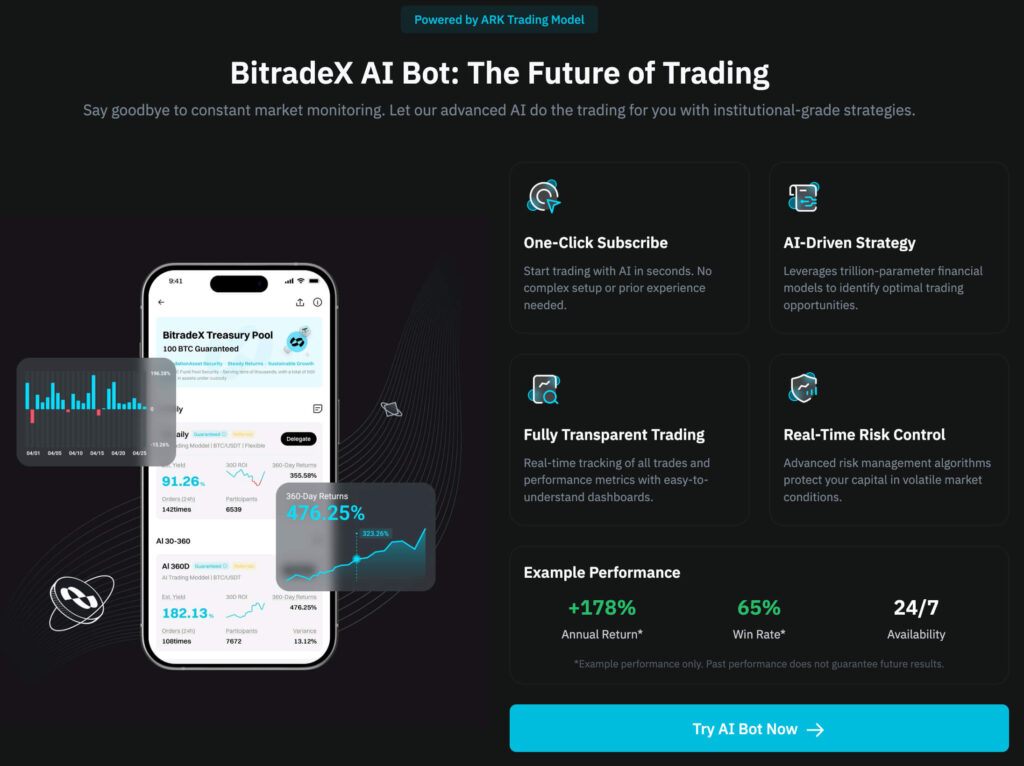
After opening a BitradeX account, the feature that attracts the most attention from users is the automated management system known as "AiBot."
This system utilizes advanced algorithms to monitor the market 24/7 and executes trades at the most optimal timing to aim for efficient asset growth.
The biggest draw is that you don't need to be glued to price charts; even those busy with work or household chores can replicate professional-level trading results.
In this section, we will take a detailed look at how to identify the best investment plan for you and the specific process for generating actual returns.
How to Choose an AI Bot That Fits Your Investment Style
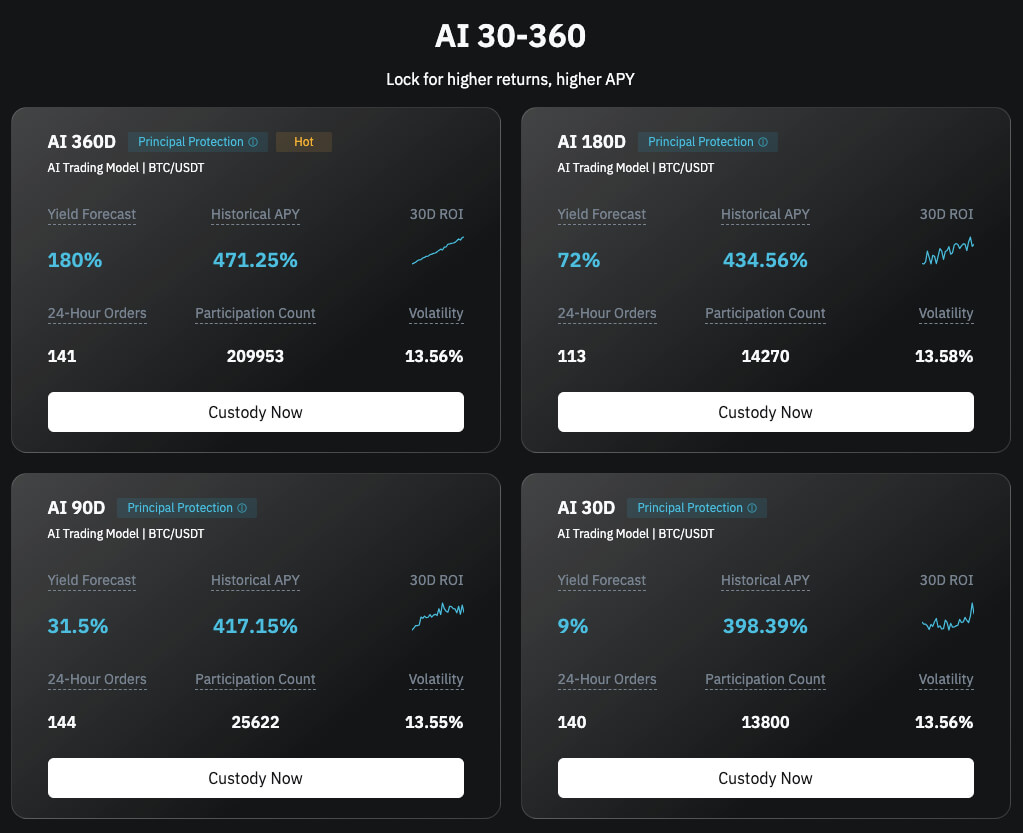
BitradeX offers several AI bot investment plans, each with different "Lock-up Periods" and "Estimated Annual Percentage Rates (APR)."
The key to long-term success is selecting a plan that aligns with your lifestyle and financial goals without overextending your budget.
Here is a general guide to the primary plans available:
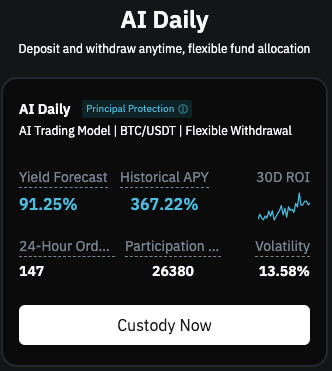
No Lock-up (Daily Plan)
This plan is characterized by its flexibility, allowing you to withdraw funds at any time. It is ideal for beginners who want to test the waters or those who need to stay prepared for unexpected expenses.
Short to Medium-Term (30-Day & 90-Day Plans)
These are suitable if you want to manage surplus funds over a period of a few months. This is a well-balanced option that typically offers higher yields than the no-lock-up plan.
Long-Term (180-Day & 360-Day Plans)
Designed for those who want to commit to growing their wealth steadily over time. With high-yield settings targeting up to 180% APR, these plans aim for maximum returns on your investment.
Furthermore, BitradeX has implemented a unique "Fund Pool System."
This mechanism acts as a safety net, where the pool provides compensation in the unlikely event that the AI incurs a loss due to market volatility.
This system functions to protect the user's principal while aiming for stable dividend payouts.
For more information about BitradeX's AiBot, please refer to the article below.
BitradeX AiBot: Step-by-Step Setup & AI Logic Explained. Is 180% APY Actually Possible?
Disclaimer: This website and its content are for informational and educational purposes only and do not constitute investment advice. Important Information, Ri…
Specific Steps from Starting Operation to Checking Your Profits
Activating an AI bot can be completed with just a few taps within the smartphone app.
No complex programming or specialized financial knowledge is required; simply follow these steps to start your automated journey:
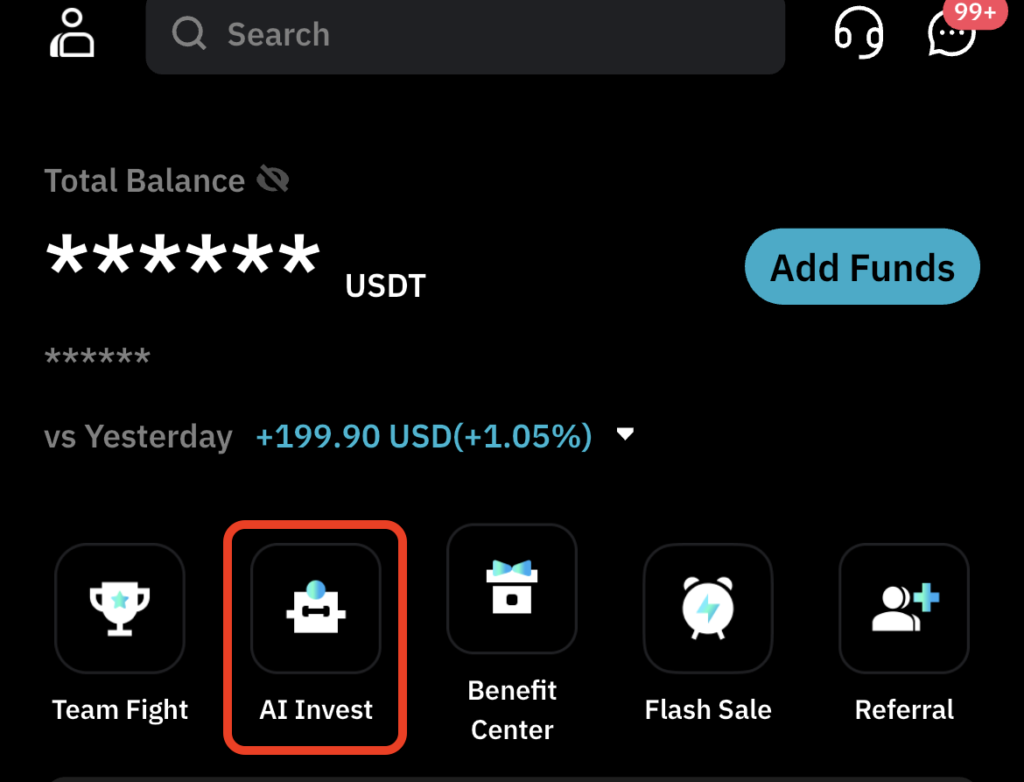
1. Tap the "AI Invest" Icon in the App
Open the dedicated AI section found at the bottom of the home screen or within the main menu.
2. Select Your Plan
Choose your desired option from the list of plans (such as 30D or 360D) and press the "Deposit" button.
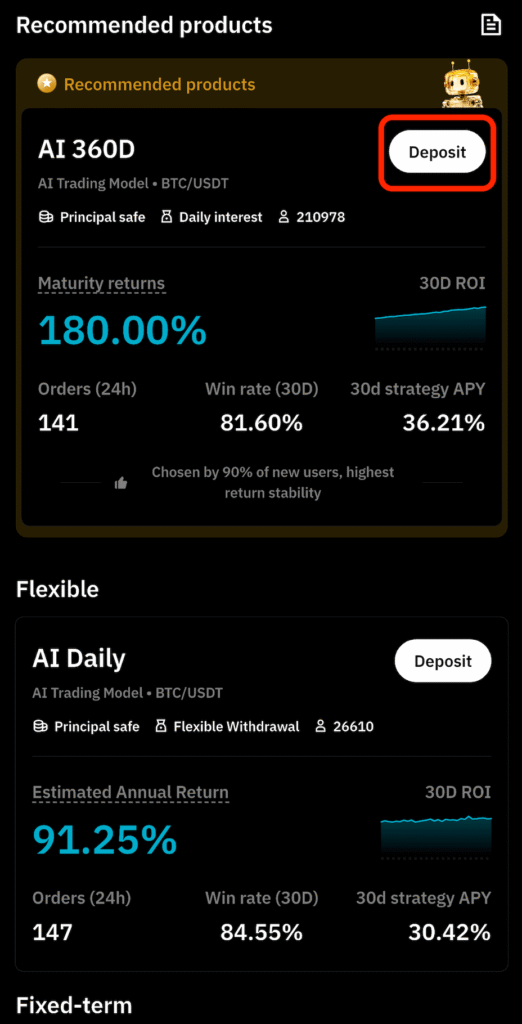
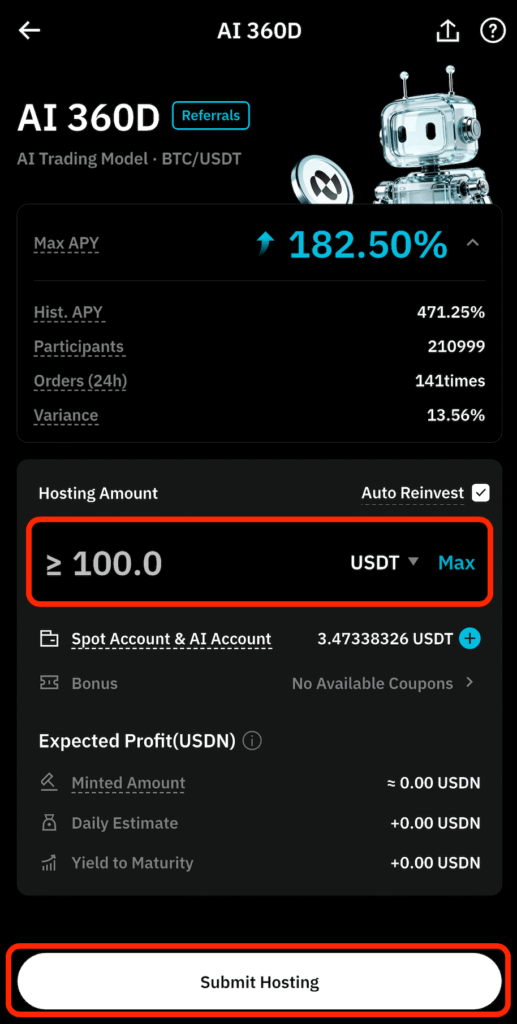
3. Enter the Amount and Confirm
Input the amount of capital (in USDT) you wish to allocate to the bot.
Check the minimum investment requirement and, if everything looks correct, click "Submit Hosting."
4. Commencement of Operations
Your setup is now complete, and the AI will immediately begin operating in the live market.
The profits generated will accumulate in the form of "USDN."
You can track your daily performance in real-time through the "My Earnings Pool" section of the app, allowing you to visually enjoy seeing your assets grow.
The rewards earned can be freely reinvested to leverage the power of compound interest or converted into cash for external withdrawal.
Maximize Earnings: Understanding BitradeX Native Tokens BTX and USDN
Once you complete your BitradeX account setup and begin operating AI bots, you will notice the terms "BTX" and "USDN" appearing frequently on your dashboard.
These tokens play a critical role in supporting the BitradeX ecosystem and its internal economy.
They are far more than just currencies for settlement; they are designed with mechanisms that significantly enhance your investment efficiency when held or utilized correctly.
To maximize profits as a beginner, it is essential to accurately grasp the characteristics of these two tokens and the specific routes for cashing them out.
The Future Potential and Ecosystem of BTX as a Profit Pillar
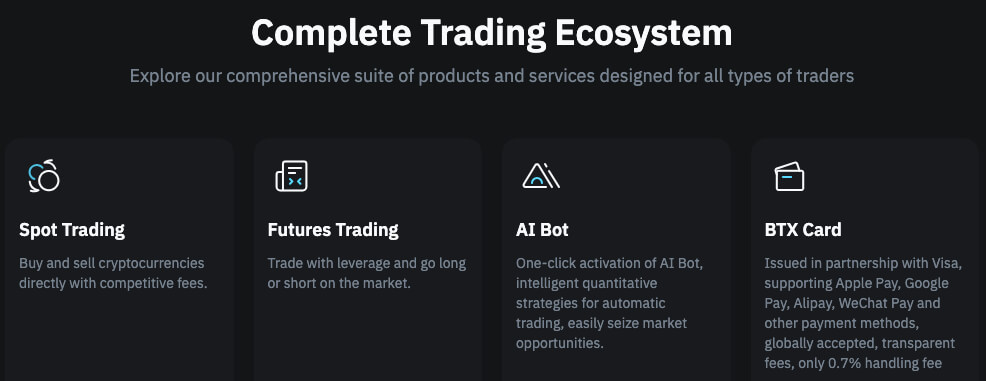
BTX is the native utility token of BitradeX, issued on the Solana (SOL) blockchain, which is renowned for its lightning-fast transaction speeds.
This token transcends being a mere digital asset, as it is architected to align with the overall growth and value of the entire platform.
The primary benefits of holding BTX include:
- Trading Fee Discounts
- By holding or using BTX, you can access a VIP program that offers up to a 90% discount on spot and derivative trading fees.
- Buyback and Burn Mechanism
BitradeX allocates 20% of its trading fee revenue to buy back BTX from the market and permanently remove it from circulation through "burning." This deflationary model reduces the total supply over time, which naturally tends to increase the scarcity and value of each remaining token. - Expectation of Asset Value Growth
As the number of AiBot users grows, the demand for BTX is expected to rise, allowing investors to aim for long-term capital gains through price appreciation.
Essential Tip for Beginners: What is "Burning"?
Burning refers to the process of making issued tokens permanently unusable. By reducing the total supply while demand remains steady or increases, this mechanism creates upward price pressure, making it a highly positive feature for long-term investors.
Converting AI Trading Rewards into Fiat Currency
When you activate an AiBot, your daily earnings accumulate in your "My Earnings Pool" in the form of "USDN," a dedicated reward token.
USDN is a highly stable currency designed to peg its value to the U.S. Dollar; however, to realize these gains as local fiat currency (such as USD or JPY), you need to follow a few specific steps.
The standard workflow for cashing out your rewards is as follows:
1. Exchange USDN for BTX or USDT
Use the "Exchange" feature within the app to convert the USDN rewards you've earned into a tradable asset.
2. Transfer to Your Spot Account
Move your converted assets from your "AI Account" to your "Spot Account."
3. Send to an External Wallet or Exchange
Transfer the funds to a local cryptocurrency exchange or top up your "BTX Card."
4. Withdraw as Fiat Currency
Sell the assets at your local exchange to withdraw to a bank account, or use the BTX Card to withdraw cash directly from an ATM.
Notably, utilizing the "BTX Card" allows you to skip the hassle of transferring crypto back to local exchanges, enabling you to use your earnings directly at ATMs or for daily shopping worldwide.
This seamless system for integrating AI-generated profits back into your lifestyle is highly rated by many global investors.
How to Withdraw and Transfer Assets from BitradeX
The process of moving profits from AI trading or held assets to your private wallet or another exchange is a critical "exit strategy" in investing.
Even for beginners who have just completed their BitradeX account setup, it is entirely possible to send assets externally safely by following the correct procedures.
However, in the world of cryptocurrency, it is extremely difficult to recover funds once they are sent to the wrong destination, so precise operation is required.
The basic steps for withdrawal are as follows:
1. Access the Withdrawal Screen
Select "Withdraw" from the asset management screen in the app or browser. (On the smartphone app, tap "Assets" at the bottom right, then select the "Overview" tab to find the "Withdraw" button.)
2. Select the Currency and Network
Tap "On-chain Withdrawal," choose the specific currency you wish to send (such as USDT or BTC), and designate the network you intend to use.
3. Enter the Destination Address
Paste the wallet address of your destination. Always avoid manual typing; instead, ensure you use the copy-and-paste function or scan a QR code to prevent errors.
4. Enter the Amount and Authenticate
Input the amount you wish to withdraw and enter your security codes, such as Two-Factor Authentication (2FA), to confirm the transaction.
The most important thing to watch out for during a transfer is a "Network Mismatch." For example, if you send USDT via the "TRC20" network but the receiving side is set to "ERC20," there is a high risk that your assets will be permanently lost.
A golden rule of crypto is to perform a test transfer with the minimum possible amount first.
Only after you have confirmed that the test funds have arrived safely should you proceed with the full transfer.
FAQ and Solutions for Registration, Deposits, and Withdrawals
Even if you encounter a problem while using BitradeX, most issues can be resolved quickly if you know the appropriate steps to take.
We have compiled a specific troubleshooting checklist for common hurdles such as "login issues" and "delays in identity verification" that beginners often face.
By following these guides, you can resolve your concerns and continue your investment journey without interruption.
What to Do If You Lose Your 2FA Code and Cannot Log In
It is not uncommon for users to lose access to their Google Authenticator codes due to switching smartphones or accidentally deleting the app.
If you find yourself locked out of your account, please attempt the following steps first:
1. Check Your Backup Key
If you have the 32-digit alphanumeric recovery key that you noted during the initial setup, you can easily restore your authentication on a new device.
2. Contact Customer Support
If you do not have a recovery key, you will need to contact the official BitradeX support center. They will guide you through a manual identity verification process to reset or disable the Two-Factor Authentication (2FA) for your account.
To prevent such situations, it is vital to always write down your backup key on a physical piece of paper and store it in a secure location during the initial 2FA setup.
Checklist for When Your Identity Verification (KYC) is Rejected
If your Identity Verification (KYC) application is not approved, it is usually due to an issue with the submitted images or information.
If your application is rejected, please review the following checklist one by one before resubmitting:
- Image Clarity
Ensure that all text on your documents is sharp and not obscured by glare or shadows from overhead lighting. - Document Expiration
Double-check that your driver’s license or passport has not expired. - Information Mismatch
The name and address you entered in the registration form must exactly match the details printed on your submitted ID. - Selfie Background and Appearance
When taking your facial verification photo, choose a brightly lit area with a simple background, and be sure to remove any hats or sunglasses.
While screenings are typically completed within a few minutes to a few hours, they may take up to 24 hours during peak periods. Staying calm and re-verifying the quality of your documents is the fastest route to getting your account fully verified.
Conclusion: Start Your Next-Generation Asset Management with BitradeX
In this guide, we have covered everything from the unique advantages of BitradeX to the specific steps for getting started.
While the world of cryptocurrency can seem complex at first glance, taking it one step at a time makes it accessible even for complete beginners.
Let’s review the key points for launching your journey:
- Account Setup in as Little as 5 Minutes
You can register with just an email address, and the process for Identity Verification (KYC) is seamless when using the mobile app. - Fully Automated AI Management
There is no need to stay glued to market charts; the proprietary AiBot works 24/7 to pursue profits based on your investment style. - Robust Security and Reliability
Your valuable assets are protected by high security scores from the global auditor "CertiK" and mandatory Two-Factor Authentication (2FA). - Leveraging a Unique Ecosystem
By holding BTX tokens, you can enjoy long-term benefits such as trading fee discounts and potential value appreciation due to its deflationary model.
One of the most important factors in investing is taking that first step—even with a small amount—to ensure you don't miss out on opportunities.
BitradeX offers convenience never seen before in traditional exchanges, including high-yield AI bot operations and the practical BTX Card for real-world use.
Start by completing your BitradeX account registration today and experience the sensation of having AI automatically grow your assets.
While all investing is done at your own risk, we hope this article provides the spark you need to make your wealth-building journey more efficient and rewarding.
If you would like to open a BitradeX account with AiBot access, you can register via the button below. (Invitation Code: ZV3OC1)
If you want to open an account that supports AiBot, you can register using the link below.
Invitation Code: G3CE71
Note: To use the BitradeX AiBot, you must register through an invitation link (like the button above). Please be aware that standard registration links do not provide access to the AiBot feature.
\ Get the latest news /